Lab 4 (experimental): Streaming a CARLA camera over 5G to an edge-app
This lab is a preview. It needs an Athena release that accepts Terminal applications, which is not published yet, and the CARLA server can still crash during long runs. Commands and files may change.
In Lab 3 you deployed the YOLO edge-app and sent it single frames from a UE. In this lab a soft UE sends a continuous camera feed instead. The camera belongs to a vehicle driving on autopilot in the CARLA simulator, so the feed shows a city with traffic for YOLO to detect.
As in Lab 3, every step uses brc. You do not need kubectl.
Only the UE to edge-app hop (bold arrows) crosses the 5G network. The CARLA client reaches
the simulator over the Pod network (dotted arrows), because it plays the role of the camera,
not of traffic the UE carries. The client and the nrUE run in the same Pod, so the client sees
the UE's tunnel interface oaitun_ue1 and binds the sockets it sends frames on to it.
The lab uses four pieces from the public BubbleRAN blueprints repository:
| Piece | Where it runs | How it is deployed |
|---|---|---|
| CARLA 0.9.16 server | a GPU node, headless | detached edge-app, apps/carla/carla-server.yaml |
| CARLA client | a container in the UE Pod | Terminal application, image built from apps/carla/client |
| YOLO edge-app | any node | detached edge-app from Lab 3, apps/yolo-edge |
| CARLA viewer (optional) | any node | detached edge-app, apps/carla/viewer |
They go up in this order. Each step depends on the one before it:
Prerequisites
- You completed Lab 3 up to Step 5: the YOLO edge-app runs as the Service
yolo-edge.brc cdk app status yolo-edgeshows it ready. - An NVIDIA GPU node with at least 8 GB of GPU memory, exposed as
nvidia.com/gpu, and anvidiaRuntimeClass. See Running on an NVIDIA GPU.brc cdk app deploychecks both and lists the GPU nodes it finds. - About 20 GB of free disk on that node. The CARLA image is 8.6 GB once unpacked, and a node that runs out of disk stops its Pods.
- An Athena release that accepts Terminal applications, containers named
app-*added to the UE Pod. - The
terminal/oai-ue,oai-ran/monolithic-gnbandoai-cn/minimalmodels (brc list model).
git clone https://github.com/bubbleran/blueprints.git
cd blueprints/apps/carla
Step 1: Deploy the CARLA server
brc cdk app deploy -f carla-server.yaml
brc cdk app status carla
brc cdk app logs carla -F
The spec asks for one GPU share, the nvidia runtime class and
NVIDIA_DRIVER_CAPABILITIES=all. CARLA renders off screen with Vulkan, so it needs the
driver's graphics libraries, not only compute. The image comes from Docker Hub
(carlasim/carla:0.9.16) and its first pull takes several minutes. The server is ready when
brc cdk app status carla shows ready=true and the log shows the Unreal Engine version
line. It listens on the Service carla, ports 2000 to 2002. Press Ctrl+C to stop following
the log.
Step 2: Build and push the client
cd client
brc cdk app build
brc cdk app push
cd ..
The client image lands in the cluster-local registry as
registry.<cluster>.local:5000/telco-fabric/<org>/carla-client:latest. This spec only builds
and pushes. The client does not run on its own: it runs inside the UE Pod, set up in the next
step.
Step 3: Deploy the network and the UE
carla-net.yaml contains an rf-sim 5G SA network, carla-net, and the Terminal car1.
Replace <cluster> and <org> in the client image, then look at the Terminal:
carla-net.yaml (Terminal car1, excerpt)
spec:
    model: terminal/oai-ue
    radio:
        device: rf-sim
        bands:
            - n78
        formation: 1x1
    readiness-check:
        method: ping
        target: google-ip
        interface-name: oaitun_ue1
    applications:
        app-carla-client:
            image: registry.<cluster>.local:5000/telco-fabric/<org>/carla-client:latest
            env:
                CARLA_HOST: carla
                CARLA_PORT: "2000"
                YOLO_URL: http://yolo-edge:9000
                INTERFACE_5G: oaitun_ue1
                CAMERA: front
                FPS: "10"
                WIDTH: "800"
                HEIGHT: "450"
                NPC_VEHICLES: "30"
                NPC_WALKERS: "20"
                ACTOR_ID: car1
The applications block adds the container app-carla-client to the UE Pod. A container in
that Pod shares the UE's network namespace, so it sees the 5G interface oaitun_ue1. The
client binds its sockets to that interface for the frames it sends, while its connection to
CARLA uses the Pod's own interface:
Install the network and the UE:
brc install network carla-net.yaml
brc observe
Wait until the network and car1 are ready, then check that the UE carries traffic:
brc test rtt car1 gateway -- -c 3
Then follow the client. brc extract logs streams the logs of every container of the UE
Element, so keep only the client's lines:
brc extract logs oai-ue.car1.car1 | grep carla-client
INFO CARLA carla:2000 -> http://yolo-edge:9000/ingest/frame/front via oaitun_ue1 as car1
INFO CARLA server 0.9.16, client 0.9.16
INFO map Carla/Maps/Town10HD_Opt, ego vehicle.tesla.model3, 30 NPC vehicles, 19 walkers, camera 800x450 at 10 fps
INFO synchronous mode at 10 Hz, this client ticks the world
INFO sent 10.0 fps, 8.99 Mbit/s, rtt 47 ms, objects 5, dropped 0, errors 0
Each simulation step then runs like this:
Step 4: Watch the feed
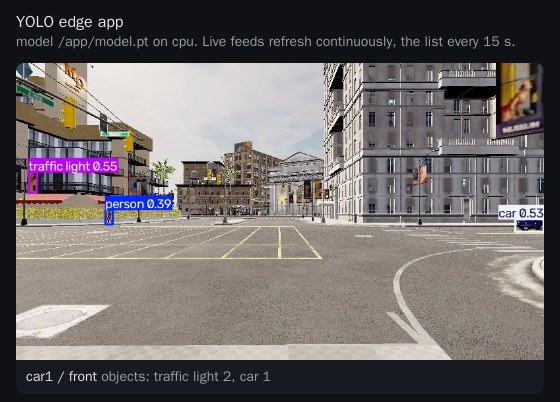
Open the YOLO Edge tab in the MX-UI. The feed car1 / front shows the city through the
ego vehicle's camera, with YOLO's boxes around cars, trucks, traffic lights and people:
Without the MX-UI, forward the Service to the machine running brc and open
http://localhost:9000/:
brc expose yolo-edge -n trirematics
Step 5: Watch the simulation
The feed shows only what the car's camera sees. To watch the simulation itself, deploy the CARLA viewer. It attaches two more cameras to the ego vehicle, one chasing it from behind and one looking straight down at it, and serves both on a web page:
cd viewer
brc cdk app build && brc cdk app push && brc cdk app deploy
brc cdk app status
cd ..
Open the CARLA viewer tab in the MX-UI, or brc expose carla-viewer -n trirematics and
http://localhost:8080/:
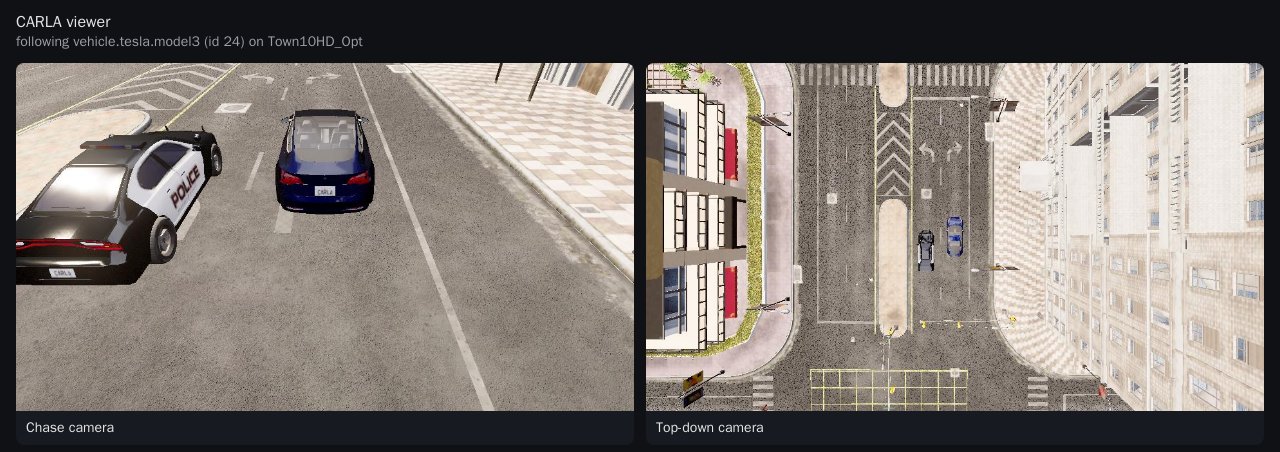
The viewer follows the vehicle whose role_name is hero, which is how the client names its
ego vehicle. It never advances the simulation: in synchronous mode it receives its frames on
the ticks of the client in car1. It reaches CARLA over the Pod network and adds the load of
two more cameras to the CARLA server.
Step 6: Verify the 5G path
With the oai-cn/minimal core, the UPF source-NATs the UE traffic. Frames that crossed the
5G network therefore reach the edge-app from the UPF's address, not from the UE Pod's:
Get the two addresses, then look at where the edge-app sees the frames from:
brc extract status upf.cn.carla-net
brc extract status oai-ue.car1.car1
brc cdk app logs yolo-edge --tail 20 | grep ingest
The IP column of brc extract status gives each Element's address. In the edge-app log,
each POST /ingest/frame/front line starts with the client address and port. Every request
must come from the UPF address. A request from the UE Pod address means the client sent it
outside the tunnel; check INTERFACE_5G in carla-net.yaml.
When the feed does not show
Several vehicles
Add one Terminal per vehicle, each with its own IMSI, ACTOR_ID and TM_PORT (the CARLA
Traffic Manager port). The vehicles share one CARLA world, and each appears as its own feed
on the edge-app's page. Exactly one client keeps TICK=1 and advances the world. Set
TICK=0 on the others. NPC_VEHICLES and NPC_WALKERS add up across clients.
The client settings are listed in the CARLA example README.
Known limits
- The client puts the CARLA server in synchronous mode at
SIM_FPS(10 Hz by default), because CARLA's Traffic Manager steers reliably only there. With the server running free, autopilot vehicles leave the road within seconds. - CARLA keeps a GPU busy. Give it its own GPU and run the edge-app on CPU or on another GPU.
- The CARLA server takes no health probes: its RPC port crashes the server when a probe opens and drops connections. Without probes it ran for more than 18 hours on our test cluster.
- If the client that ticks the world is killed in the middle of a session, the server can stop
answering, and clients then fail with
time-out ... while waiting for the simulator. Restart the server withbrc cdk app deploy -f carla-server.yaml. The client and the viewer reconnect and spawn again on their own:
- The rf-sim UE can drop and re-attach. Periodic SRS on the gNB, already set in
carla-net.yaml, keeps it stable. The client skips frames whileoaitun_ue1is down.
Removing
brc remove network carla-net.yaml
brc cdk app delete carla-viewer
brc cdk app delete carla
Keep the YOLO edge-app for Lab 3, or remove it with brc cdk app delete yolo-edge.