Lab 9: Traffic Steering Dynamic rApp
In this lab, you will deploy a 5G Standalone (SA) network using OAI CU/DU with USRPs, OAI CN, FlexRIC as the Near-RT RIC, and a Quectel module as a COTS UE. This experiment requires at least two USRPs and one Quectel module.
In the second phase of the experiment, you will deploy a pre-packaged Traffic Steering (TS) Dynamic rApp on the MX-PDK cluster using a DynamicrApp manifest. Unlike the rApp script from Lab 7, this rApp ships with a built-in user interface that lets you dynamically create and manage traffic steering policies at runtime. These policies are sent to the Non-RT RIC via the R1 interface, forwarded to the Near-RT RIC over the A1 interface, and ultimately enforced at the gNB by a corresponding xApp over the E2 interface, which triggers handovers that steer UEs from one cell to another.
apiVersion: athena.trirematics.io/v1
kind: Network
metadata:
  name: handover
  namespace: trirematics
spec:
  slices:
    -   plmn: "00101"
        dnn: "internet"
        network-mode: "IPv4"
        service-type: 1
        differentiator: 0x000000
        ipv4-range: "12.1.1.0/24"
        ipv6-range: "2001:db8:1::/64"
  access:
    -   name: oai-gnb-cu-du
        stack: 5g-sa
        model: oai-ran/cu-du
        radio:
          device: uhd-b200
        identity:
          an-id: 50
        cells:
          -   band: n78
              arfcn: 630048
              bandwidth: 40MHz
              subcarrier-spacing: 30kHz
              tdd-config:
                period: 5000
                dl-slots: 7
                dl-symbols: 6
                ul-slots: 2
                ul-symbols: 4
              groups:
                -   kind: hog
                    name: handover-group
        controller: flexric.handover
        core-networks:
          - minimal.handover
    -   name: oai-gnb-du
        stack: 5g-sa
        model: oai-ran/du
        radio:
          device: uhd-b200
        identity:
          an-id: 20
        annotations:
          extras.t9s.io/cu-name: "oai-gnb-cu-du"
        cells:
          -   band: n78
              arfcn: 643296
              bandwidth: 40MHz
              subcarrier-spacing: 30kHz
              tdd-config:
                period: 5000
                dl-slots: 7
                dl-symbols: 6
                ul-slots: 2
                ul-symbols: 4
              groups:
                -   kind: hog
                    name: handover-group
        controller: flexric.handover
        core-networks:
          - minimal.handover
  core:
    -   name: minimal
        stack: 5g-sa
        model: oai-cn/minimal
        identity:
          region: 0
          cn-group: 4
          cn-id: 5
  edge:
    -   name: flexric
        stack: 5g-sa
        model: mosaic5g/flexric
  dns:
    ipv4:
      default: 8.8.8.8
      secondary: 8.8.4.4
---
apiVersion: athena.trirematics.io/v1
kind: Terminal
metadata:
  name: ue1
  namespace: trirematics
spec:
  vendor: oai
  stack: 5g-sa
  model: terminal/quectel
  target-cores:
    - minimal.handover
  identity:
    imsi: "001010000000011"
    pin: "1234"
    opc: "0xC42449363BBAD02B66D16BC975D77CC1"
    key: "0xfec86ba6eb707ed08905757b1bb44b8f"
    sqn: "0xff9bb4000001"
  slice:
    dnn: internet
    network-mode: IPv4
    service-type: 1
    differentiator: 0x000000
  radio:
    bands:
      - n78
      - n77
  readiness-check:
    method: ping
    target: google-ip
Network Deployment
Deploy the network using the following command:
brc install network ho-net.yaml
The ho-net.yaml file does not include the xApp or the rApp. The rApp is deployed separately in the next section, and the xApp is deployed automatically by the SMO once the Non-RT RIC receives the first traffic steering policy.
Check the status of the deployment using brc observe and wait until all Elements reach the 1/1 Y state.
Before steering any traffic, test UE connectivity:
brc test rtt ue1 gateway -- -c 3
Traffic Steering Dynamic rApp Deployment
The rApp is defined as a DynamicrApp resource, which references a pre-built model image. The cluster pulls and runs the image, exposing the rApp’s user interface automatically.
apiVersion: odin.trirematics.io/v1
kind: DynamicrApp
metadata:
  name: ts-rapp
  namespace: trirematics
spec:
  model: bubbleran/ts-rapp
---
apiVersion: v1
kind: Service
metadata:
  name: ts-rapp
  namespace: trirematics
spec:
  selector:
    odin.t9s.io/rapp: ts-rapp
  ports:
    - name: http
      port: 9900
      targetPort: 9900
      nodePort: 30990
  type: NodePort
Deploy the rApp using the following command:
brc install rapp ts-dynrapp.yaml
If the deployment fails with an error such as provided port 30990 is already allocated, the requested nodePort is already in use on the cluster. Edit the nodePort field in ts-dynrapp.yaml, set it to a free port within the 30000–32767 range (e.g., 30991), and redeploy the rApp.
Check the status with brc observe. You should see a new element named ts-rapp.ts-rapp.dynrapp appear in the list of deployed elements. Wait until it reaches the 1/1 Y state before proceeding. You can also find ts-rapp in the list of deployed rApps.
Open the rApp’s user interface in your browser. The rApp is exposed via a NodePort service on port 30990, so navigate to http://<node-ip>:30990 to access the interface. If you changed the nodePort in the previous step, use that port instead.
The Traffic Steering Control Panel lets you define a policy by specifying the Network Name, the target Near-RT RIC, the Target Cell (NCI) (NR Cell Identity), the Preference (SHALL or FORBID), and the UE ID (a 16-character hex string, where all zeros applies the policy to every UE).
To start the monitoring and steering process, first send a bootstrap policy with Target Cell (NCI) 0, Preference SHALL (0), and an all-zeros UE ID, as shown below. This triggers the TS xApp in the Near-RT RIC to start monitoring UE and cell conditions. Click Apply TS Policy to push the policy to the Non-RT RIC over the R1 interface. You can check the status of the policy with brc observe in the rApp jobs tab, where it should show as Running.
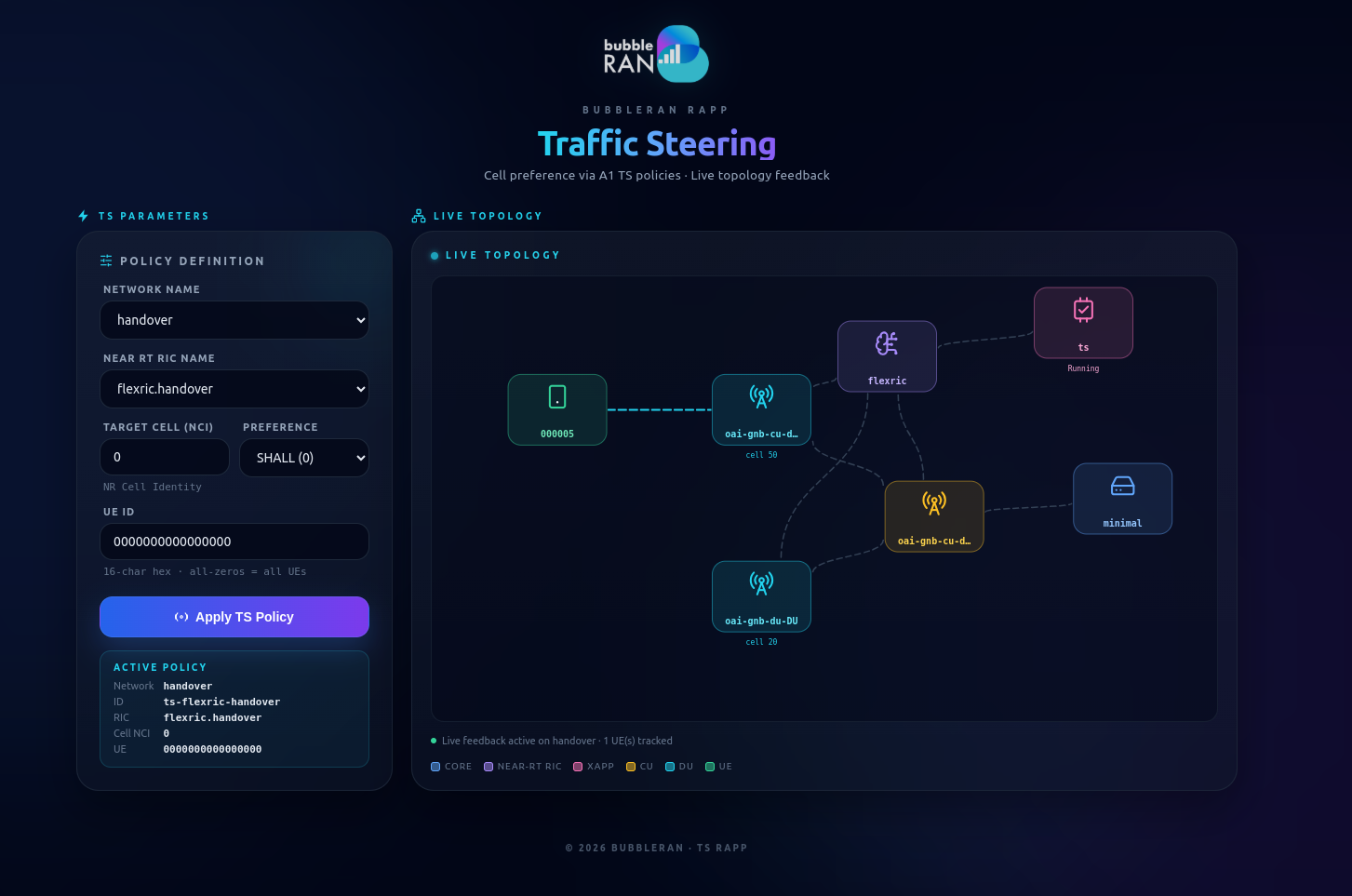
After the policy is applied, the SMO automatically deploys the corresponding xApp on the cluster. You should see a new xApp named ts.dynxapp-flexric.handover in the list of deployed xApps. Wait until it reaches the 1/1 Y state before proceeding.
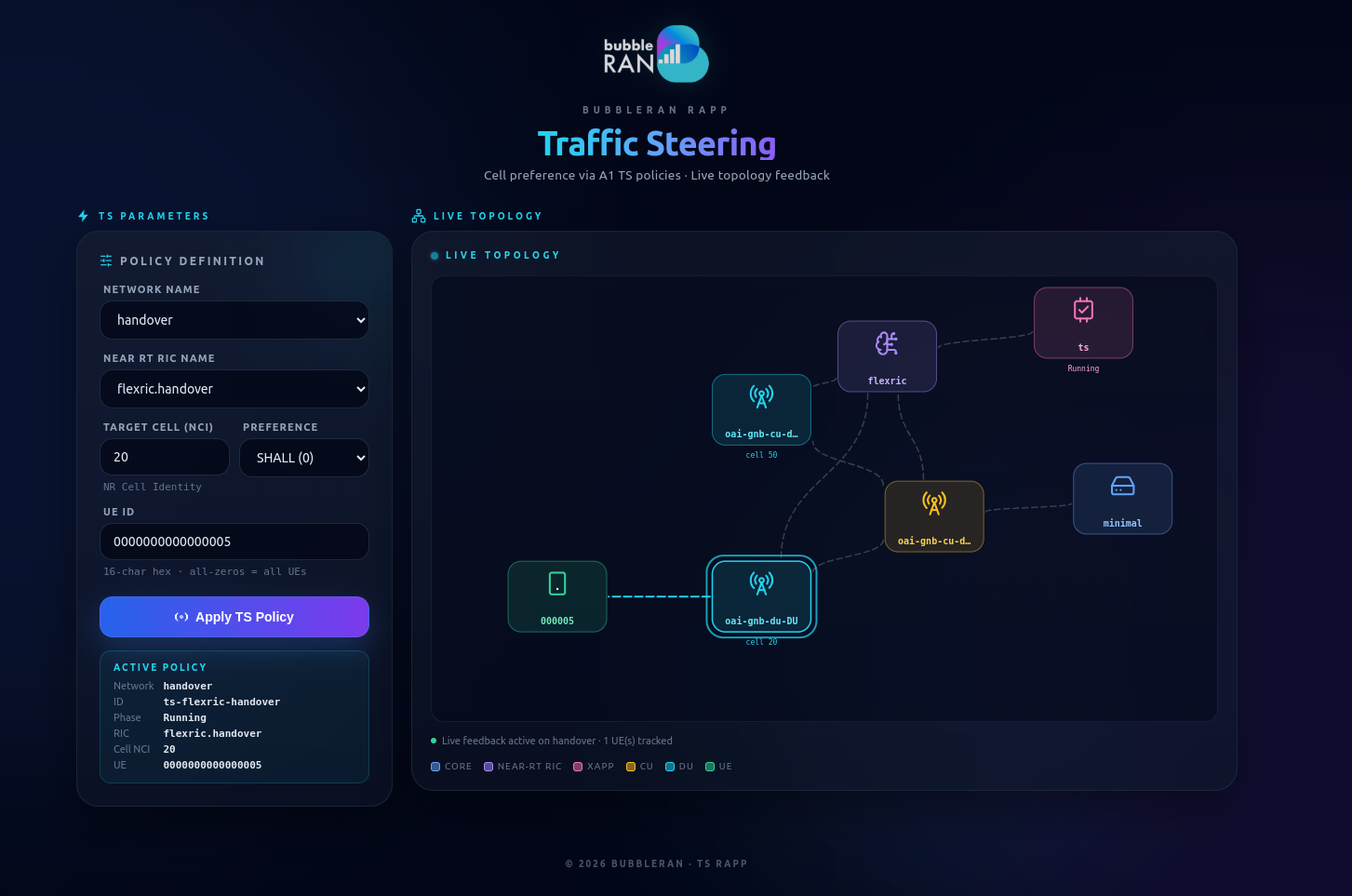
Once the xApp is monitoring, the Live Topology panel shows each UE and the cell it is currently attached to. Using the UE ID and cell identity reported there, you can steer a specific UE: set the Target Cell (NCI) and UE ID, choose a Preference, and click Apply TS Policy again. The desired state is forwarded to the xApp, which triggers a handover via RC Control requests:
SHALLsteers the selected UE to the target cell. In the example below, UE…0005is steered to cell20.
FORBIDprevents the selected UE from camping on the target cell, steering it away to another cell. In the example below, UE…0005is forbidden from cell20and falls back to cell50.
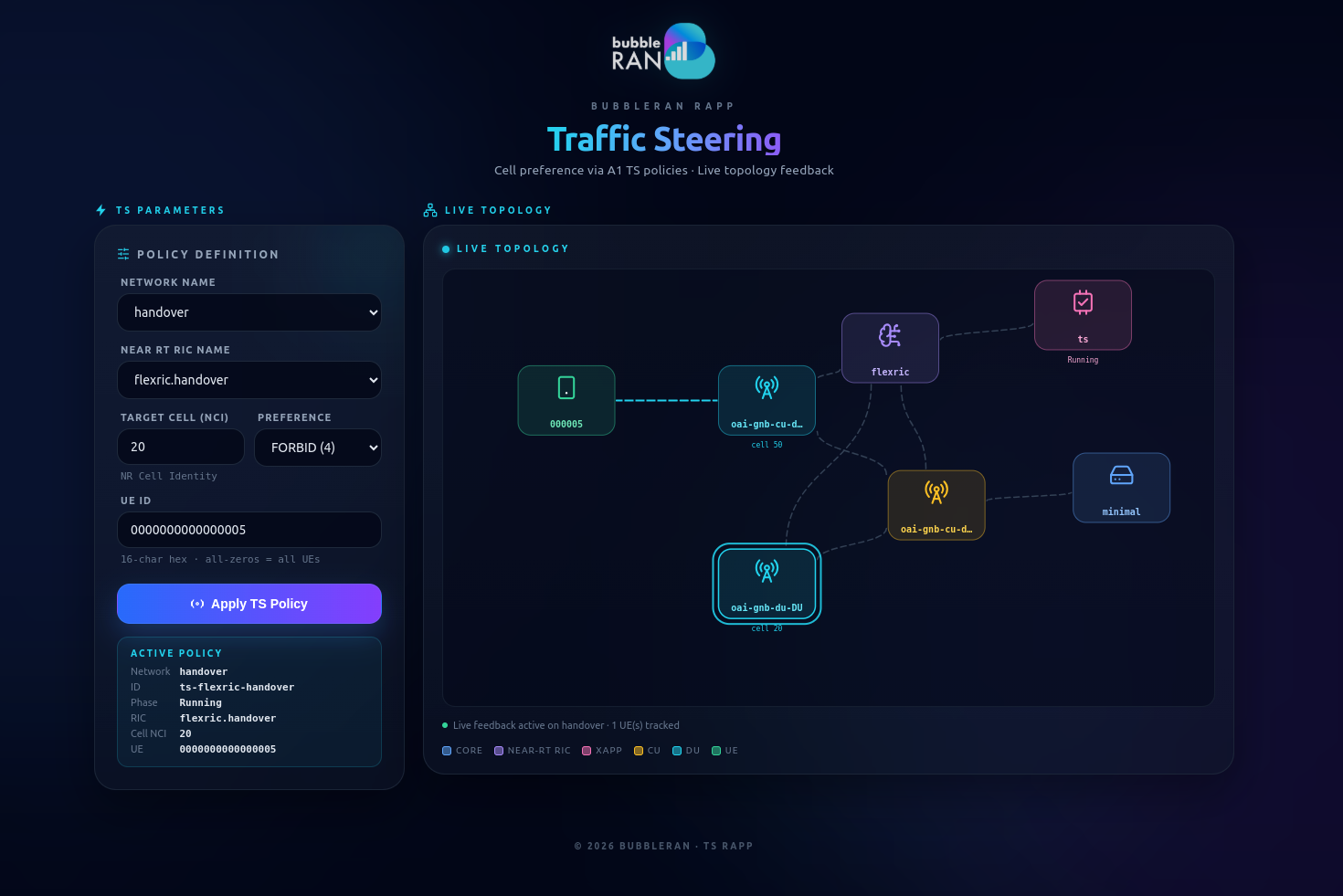
The xApp maintains a control loop with the gNB over the E2 interface. It monitors UE and cell conditions through RC Indication messages from the Near-RT RIC and enforces the policy by triggering a handover that steers the selected UE to (or away from) the target cell via RC Control requests.
Check the xApp logs with brc extract logs ts.dynxapp-flexric.handover, brc extract logs oai-gnb-du.oai-gnb-du.handover, and brc extract logs oai-gnb-du.oai-gnb-cu-du.handover inspect the handover process.
Uninstall
Remove the network and all associated resources with the following command:
brc remove network ho-net.yaml
brc remove policyjob ts-flexric-handover
brc remove rapp ts-dynrapp.yaml
Verify with brc observe that all Elements and rApp jobs have been removed.
💬 Questions
- Explain how the rApp, Non-RT RIC, Near-RT RIC, xApp, and gNB interact to enforce a traffic steering policy in this lab. For each step, name the component and the interface it uses (R1, A1, E2, etc.).
- Why does the traffic steering policy need the UE ID and Target Cell (NCI) values, and where can you find then NCIs in the
net-ho.yamlfile? - Change the traffic steering policy to hand the UE over to the other target cell, then verify the result from the xApp or DU logs.