High Level documentation of BAT-CLI
Introduction
BAT-CLI (BubbleRAN Agentic Toolkit CLI) is a command-line companion to BAT-ADK. It gives you a single entry point to scaffold, configure, containerize, and evaluate BAT agents, so you can move from an empty directory to a deployed, benchmarked agent without writing boilerplate.
The CLI is distributed on PyPI as bat-cli and exposes a single executable: bat.
Design Philosophy
BAT-CLI is designed to let you focus on agent behavior, not on the surrounding lifecycle plumbing. It encodes the conventions of a BAT agent project (its file layout, environment variables, Docker build, and evaluation harness) into a handful of commands, so every agent looks the same and ships the same way.
The tool is built with Typer and organized as a tree of subcommands, each owning one stage of the agent lifecycle.
Preliminary Concepts
Before using BAT-CLI, you should be familiar with a few core ideas:
-
BAT-ADK basics Understand what an Agent Application, Agent Card (
agent.json), and Agent Configuration (config.yaml) are, since the CLI generates and operates on them. -
The agent project layout A BAT agent is a Python project (managed with uv) with a conventional structure:
agent.json,config.yaml,pyproject.toml, a.env, and asrc/package containing the graph and LLM clients. -
A2A fundamentals Know that agents expose an A2A server over HTTP. The evaluation engine drives an agent purely through this A2A endpoint.
Command Tree at a Glance
The CLI is a tree of subcommands, each mapping to one lifecycle stage:
bat
├── init
│   └── agent
│       ├── <name>
│       ├── --clients, -c
│       ├── --output-dir, -o
│       ├── --force, -f
│       ├── --port
│       ├── --model
│       └── --model-provider
├── add
│   └── client
│       ├── <clients>
│       └── --force, -f
├── set
│   └── env
│       ├── --port
│       ├── --model
│       ├── --model-provider
│       ├── --docker-registry
│       └── --repo
├── eval
│   ├── init
│   │   └── --force, -f
│   ├── run
│   ├── show
│   └── plot
│       ├── --folder, -f
│       └── --filter, -F
├── build
│   ├── --context, -C
│   ├── --docker-registry
│   ├── --repo
│   ├── --version
│   └── --no-cache
├── push
│   ├── --context, -C
│   ├── --docker-registry
│   ├── --repo
│   └── --version
└── version
Each top-level branch maps to one lifecycle stage: create (init), extend (add), configure (set), evaluate (eval), and containerize/distribute (build, push). The standalone version command reports the installed toolkit version.
Built-in help is available at every level (bat --help, bat eval --help, ...). For exact flags and examples, see the README; this document focuses on the concepts behind each stage.
Scaffolding (init / add)
The scaffolding commands generate the conventional structure of a BAT agent from templates, so every agent starts from the same well-formed baseline.
Creating an Agent
bat init agent <name> produces a complete, runnable agent project: the Agent Card (agent.json), the Agent Configuration (config.yaml), a pyproject.toml, a Dockerfile and Makefile, a .env, and a src/ package containing the AgentGraph and the LLM clients.
The command parameterizes the generated files so the new agent is ready to run:
--clientspre-generates one ChatModelClient scaffold per name you provide.--port,--model, and--model-providerare written directly into the.env.
Adding Clients Later
bat add client <names> adds new ChatModelClient scaffolds to an existing agent. It must be run from the agent root (it expects src/llm_clients/ to exist) and refuses to overwrite files unless --force is given.
This keeps the "one client per LLM role" pattern (e.g. reformulator, planner, executor) consistent whether the clients are created up front or added incrementally.
Configuration (set env)
bat set env performs in-place updates to an existing agent's .env, without regenerating any other file. It can set the runtime values (PORT, MODEL, MODEL_PROVIDER) as well as the Docker defaults (BAT_DOCKER_REGISTRY, BAT_DOCKER_REPO) consumed by build and push.
It is intentionally strict: it must be run from a directory containing a .env, and it requires at least one value to set, so it never silently does nothing.
Containerization (build / push)
The build and push commands turn an agent project into a distributable container image.
Image Reference
Both commands resolve a single image reference of the form:
{registry}/{repo}:{version}
The --version is used both as the image tag and as a VERSION build argument passed into the Docker build, so the running container can report the version it was built from.
Configuration Precedence
The registry and repository can come from several sources. The CLI resolves them in a fixed order of precedence, which lets you set sane defaults in .env and override them per-invocation:
- CLI flag (
--docker-registry/--repo) - Shell environment variable (
BAT_DOCKER_REGISTRY/BAT_DOCKER_REPO) - The
.envfile in the current directory - A hardcoded fallback default
This means that once an agent's .env carries the Docker defaults, bat build and bat push can be run with no arguments at all.
Evaluation Engine (eval)
The evaluation engine is the most substantial part of BAT-CLI. It runs a dataset of tasks against a live agent, judges the outcomes, and produces machine-readable artifacts and charts. It is exposed through four subcommands — init, show, run, and plot — and is implemented as a pipeline of cooperating components.
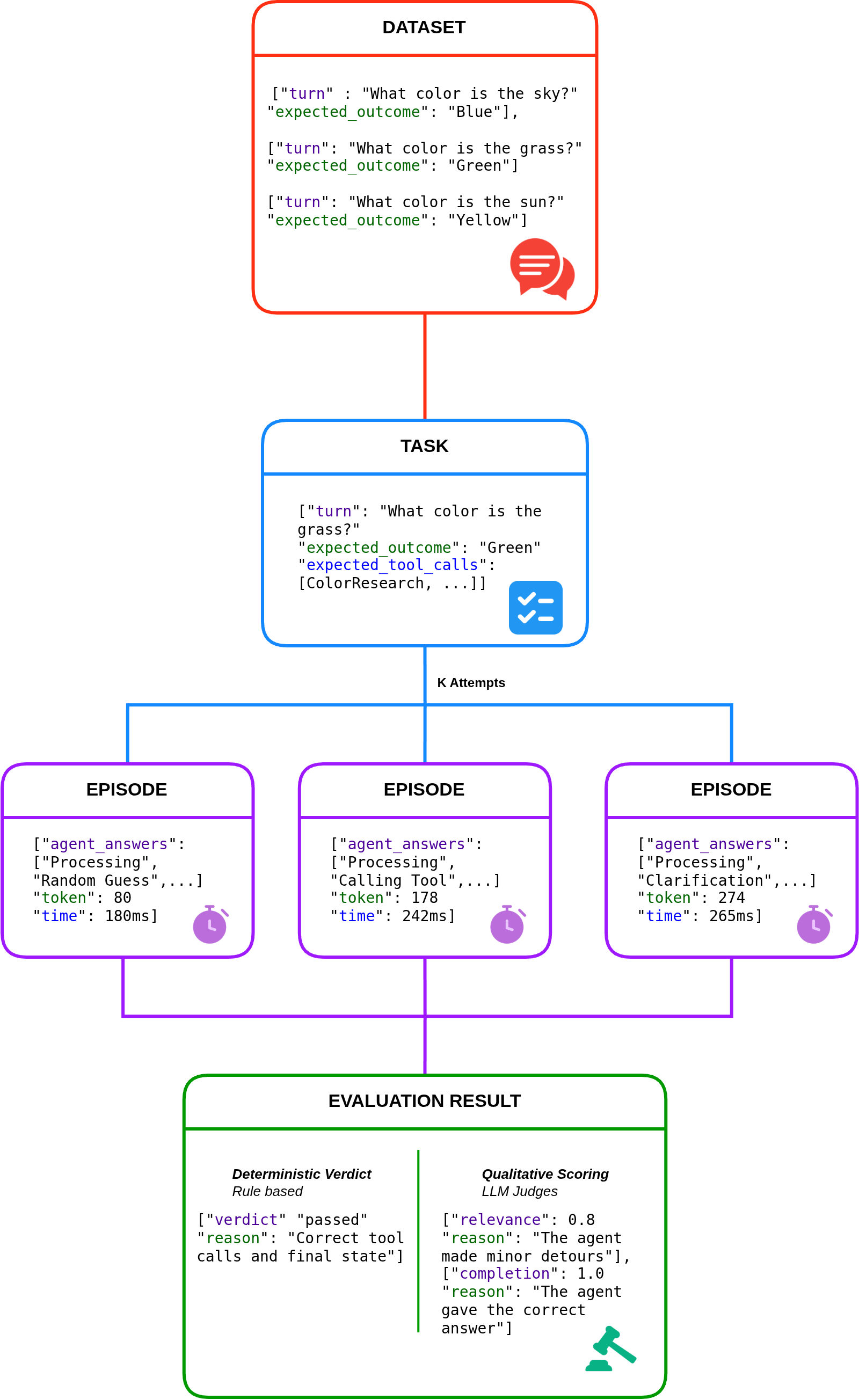
Pipeline Overview
The diagram above shows how the engine flows from a static dataset to a judged result. Each stage corresponds to one of the components described in the sections that follow:
- Dataset — the full collection of tasks to evaluate. Each entry pairs a conversational
turnwith anexpected_outcome, describing both what the agent is asked and what success looks like. - Task — a single entry drawn from the dataset (a
TaskSpec), enriched with its expectations: theexpected_outcome, theexpected_tool_calls, and the other checks the agent will be measured against. - Episodes (K Attempts) — each task is run
ktimes against the live agent. Every attempt is one Episode that records the agent's answers, token usage, and timing. Running multiple attempts lets the engine measure reliability, not just a single pass/fail. - Evaluation Result — the episodes are judged along two complementary axes:
- a Deterministic Verdict — rule-based, reproducible, and LLM-free (
passed+ areason, e.g. "Correct tool calls and final state"). - an optional Qualitative Scoring — LLM judges that score dimensions such as
relevanceandcompletion, each with a free-text justification.
- a Deterministic Verdict — rule-based, reproducible, and LLM-free (
Evaluation Configuration
Everything an evaluation needs is described in eval/eval.yaml, validated into an EvalConfig model. It declares:
- the dataset of tasks and the output directory,
- the agent URL plus startup/shutdown timeouts,
k— how many attempts to run per task (for measuring reliability, not just pass/fail),- whether qualitative (LLM-judge) scoring is enabled,
- the list of models to evaluate, and an optional judge model used for qualitative scoring.
bat eval init scaffolds this file (along with eval/input/tasks.json and eval/output/), and bat eval show prints the fully resolved configuration so you can confirm what will run before running it.
Tasks and Expectations
Each entry in the dataset is a TaskSpec: an id, a list of conversational turns, and an TaskExpected block describing what success looks like. Expectations are intentionally multi-faceted:
status— the expected final A2A task status (e.g.completed).output_must_contain— phrases that must appear verbatim in the final output.tool_calls— tools the agent is expected to call, matched by name and an argument subset (only the keys you specify must match), with a minimum call count.expected_outcome— a free-text description of the desired result, evaluated semantically by the LLM judge rather than by string matching.
Running an Episode
For each task and each of its k attempts, the engine drives the agent through the BatA2AAdapter, which speaks the A2A protocol over the configured agent URL. The adapter consumes the agent's stream and records an EpisodeTrace: the sequence of status events, token usage, timings, and the tool calls the agent made. The result of one attempt is an EpisodeResult carrying the final status, final output, and trace.
The
bat eval runcommand starts the agent itself (viauv run .from the agent root) and waits until the agent URL accepts connections, so the agent project must have its own dependencies installed.
Deterministic Verdict
Once an episode completes, the EpisodeEvaluator produces a deterministic EpisodeVerdict (passed + a human-readable reason). It runs each declared expectation as an independent check — status match, each required phrase, and each expected tool call — and the episode passes only if all checks pass. The reason string concatenates every check, so a failure tells you exactly which expectation was not met.
This stage is purely rule-based and reproducible: it does not call an LLM.
Qualitative Scoring (optional)
When qualitative: true, an additional LLM-judge pass scores each episode along several dimensions:
- response relevance
- task completion quality
- hallucination score
- tool-call appropriateness
These scores (a QualitativeScores object, including the judge's reasoning) complement the deterministic verdict with a semantic assessment of quality. The scores are based on how the LLM has been instructed and may slightly vary between run and dependes on which model is used as a judge. Scoring runs concurrently across episodes for speed.
Artifacts
Every run writes a structured set of artifacts under the output directory:
episodes/— one JSON file per attempt (fullEpisodeResult, including the trace).summary.json— per-task pass/fail counts, success percentage across thekattempts, and averaged qualitative scores.metrics.json— aggregated metrics for the run (e.g. pass@k style summaries).
Because attempts are kept per-task and per-model, results from multiple models or runs sit side by side in the same output tree.
Visualization (plot)
bat eval plot reads the metrics.json files produced by run and renders charts back into the output folder. Each sub-folder containing a metrics.json is treated as one run, so a single plot invocation can compare multiple models or runs. The --filter option narrows the per-task charts to a subset of task ids, while summary charts always cover all runs.
Version (version)
bat version prints the installed BAT-CLI version and exits. The value is read from the package metadata of the installed bat-cli distribution, so it always reflects the exact build in use — handy when reporting issues or confirming an upgrade. If the CLI is run from a source checkout that is not installed as a package, the command reports that the version is unavailable and exits non-zero.